Migrating Carnegie Mellon University From Cascade CMS to Drupal
Leading a Content Migration While Editors Kept Publishing
A first-person engineering case study on leading a Cascade CMS to Drupal migration for Carnegie Mellon University with one other developer, a tight budget and no content freeze, including the recorded walkthrough of the approach.
Executive Summary
While I was at Lullabot, Carnegie Mellon University (CMU) wanted to move a website from Cascade CMS to Drupal. The reasons were practical: more room to customize, a platform that could scale with the university’s needs, and more granular editorial permissions than the existing setup allowed.
The interesting part was not the destination. It was the constraints around the move.
The client was clear from the start: the editorial team could not stop publishing, and the work had to be done with the resources they were willing to fund. In practice that meant two developers, part-time review from Lullabot’s software architect, and a small budget of hours for me to lead it.
I led the migration. I wrote the technical approach, presented it with a delivery plan to everyone who had to agree to it, built the core of the migration myself, and set it up so a second developer could carry the remaining content types without me becoming a bottleneck.
Video Walkthrough
I recorded this walkthrough after the project. It covers the overview of the technical approach, the architecture, and a demo of the main classes, using a modified copy of the code.
The Delivery Side: A Junior Team Under Tight Constraints
A second video covers the same project from the delivery side: the senior architect was not available, the budget was tight, the developers on hand were junior PHP developers, and editors kept publishing while the migration ran. It explains why I chose batched Drush commands over the full Migrate API, and how I set up the team so the work did not depend on me.
- Watch on Loom
- Blog post: Successful CMS migration to Drupal with a junior team under tight constraints
The Constraints
| Constraint | What it meant for the design |
|---|---|
| No content freeze | Editors kept publishing in Cascade, so the migration had to be repeatable rather than a one-shot export |
| Client-funded resources only | Two developers and a few hours of architect time, so the design had to be simple enough to hand over |
| A single usable API endpoint | Cascade exposed page content and each page’s children, not a bulk export |
| Many content types | Articles, landing pages, blog posts and events each needed their own field mapping |
None of these is unusual on its own. Together, they rule out the two approaches teams usually reach for first. A big-bang export and import fails the “no freeze” constraint. A sophisticated, fully generic migration framework fails the “two people, small budget” constraint, because the second developer has to be productive in days, not weeks.
Writing the Technical Approach
Before writing migration code, I wrote the technical approach down. The document had an overview of the strategy, the Jira epics and tickets, the proposed class design and how the classes would be distributed, a few slides on what the result would look like, and a conclusion.
I presented it to Lullabot’s software architect, and then to the client, the project manager, the product owner and the development team. I also proposed who would work on which migration tickets and presented a Gantt chart for the delivery. The client was enthusiastic about it and wanted to start the migration immediately.
That document did more work than any single class in the codebase. It turned a vague “move us to Drupal” into a plan that a budget holder could approve, an architect could challenge, and a second developer could pick up.
Architecture Overview
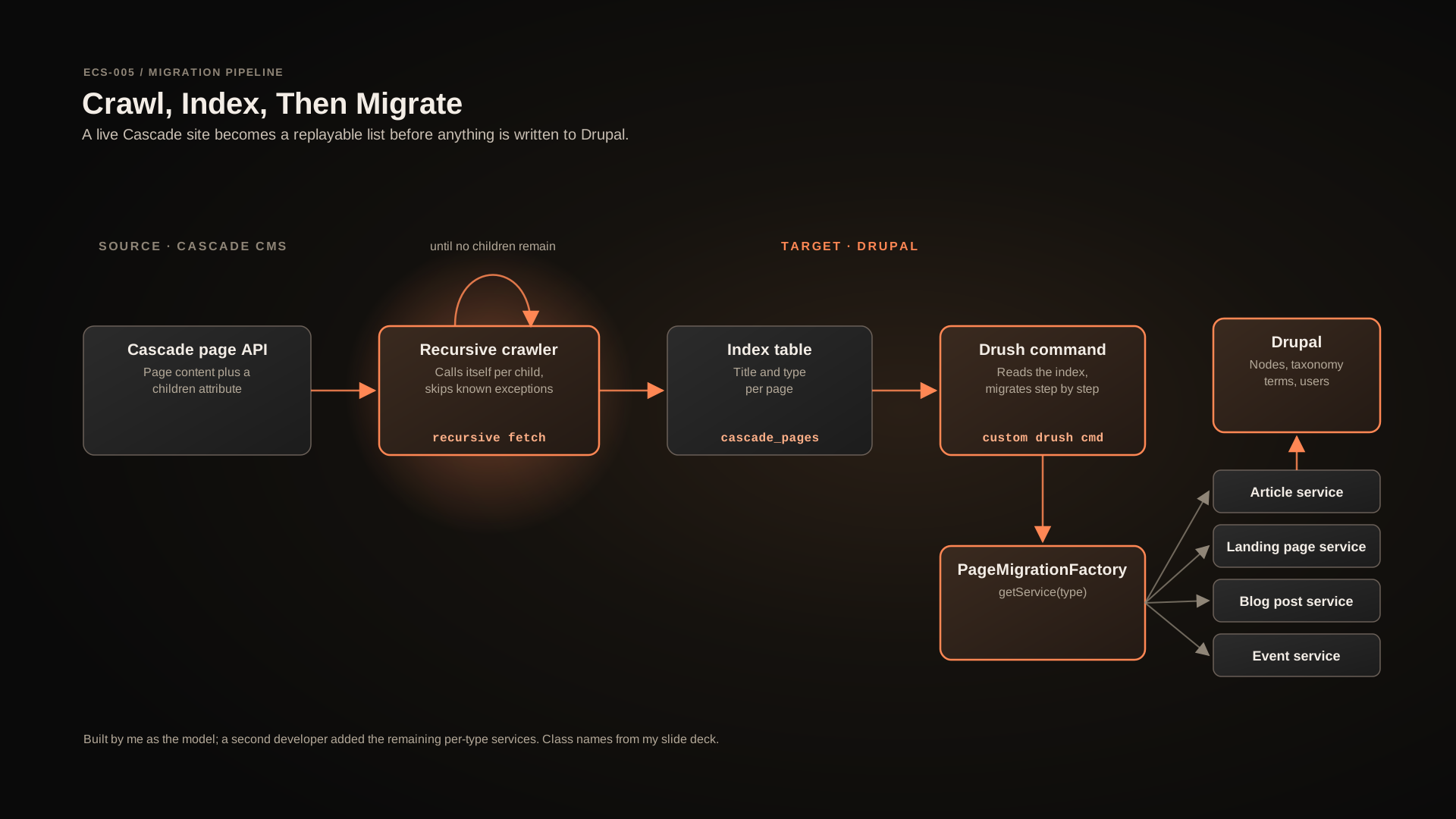
Cascade organizes a site as folders, files and nested structures. When I looked for a way in, I found an endpoint that returned the content of a page, such as the admissions page, together with a children attribute pointing to the pages below it. That was enough to reach the whole site.
The migration ran in four steps:
- Crawl. A recursive method fetches a page, stores it, and calls itself for each child until there are no more folders or files to read.
- Index. Each page goes into a single database table,
cascade_pages, with only what is needed to plan the migration, such as its title and type. - Migrate. A custom Drush command reads that table and runs the migration step by step.
- Create. Per content type, a migration service creates the Drupal nodes, taxonomy terms and users.
Not every Cascade page belonged in the new site, so the crawler skipped a small set of known exceptions instead of migrating them blindly. Engineering Approach Note Cascade had no bulk export I could rely on, only a page endpoint with children. Editors were changing content the whole time, so whatever I built had to be safe to run more than once. Separate discovery from migration. The crawler walks the tree and records an index of pages (title and type), with defensive handling around each request and each child in the loop. It deliberately does not store everything: the index is a plan, not a copy of the site. Two passes take longer than one. In exchange, the team could see exactly what would be migrated before anything was created in Drupal, skip pages that did not belong, and re-crawl when editors changed the source. Engineering Approach Note The budget did not allow weeks of ramp-up on a large, generic migration framework for a second developer who would be writing most of the per-type migrations. Keep the execution path explicit: one Drush command, one table to read, one service per content type to call. Anyone on the team could read the command, run it against a local copy and see the pages appear. A custom command gives up some conveniences of a full migration framework. My analysis is that for a site of this shape and a team of this size, an explicit pipeline was easier to review, easier to re-run and easier to hand over. Engineering Approach Note The content types (articles, landing pages, blog posts, events) shared the same flow but differed in field mapping. The second developer needed a pattern, not a blank page. A final A factory adds a level of indirection that a two-type migration would not need. With several content types and two developers, it meant the next migration was "copy the model, change the mapping", which is exactly the kind of work that can be split across tickets.AN-001 — Crawl Into an Index Before Migrating Anything
cascade_pages tableContext
The Approach
Tradeoffs
AN-002 — A Custom Drush Command Instead of a Heavier Migration Stack
Context
The Approach
Tradeoffs
AN-003 — A Migration Factory Another Developer Can Extend
PageMigrationFactory returns one migration service per content typeCMUArticleMigrationService, CMULandingPageMigrationServiceContext
The Approach
PageMigrationFactory class exposes a getService() method that, based on the page type from the index, returns the matching migration service. Each service is a small final class that knows how to create one kind of node, with its fields, paragraphs and taxonomy references. I built the factory and the first services as the model, and documented the project in a README.Tradeoffs
Team and Delivery
The team was me plus one other developer, with part-time input from Lullabot’s architect. The client agreed one additional developer was enough, and I thought so too. I built the crawler, the index table, the Drush command, the factory and the first migration classes. The other developer then built the remaining per-type migrations on top of that model.
The plan in the slides was about four weeks of development. The work was later extended because the client chose to stay within its limited budget, which was a reasonable decision given that the structure made it easy to keep adding content types at a sustainable pace.
The developers available were junior, so the plan had to carry more than tickets. I gave the team a UML class diagram of the migration model, field-mapping examples, written documentation, assigned tickets and a Gantt plan, and ran live training sessions. The index table recorded each page’s ID, type, migration status and resulting Drupal entity ID, and the Drush command ran in batches, so a failed or interrupted run could be resumed safely instead of hitting timeouts or starting over.
I was hands-on throughout, not only the person who wrote the plan. The client later left me a LinkedIn recommendation for this work.
Lessons Learned
Write the approach before the code. On a constrained project, a document the client, the PM and the architect can all read is what buys you the room to execute.
Separate discovery from migration. An index table turns an uncertain, changing source into a list you can inspect, filter and replay.
Design for the next developer. The most valuable class in this migration was the one that let someone else add a content type without asking me how.
Budget is a design input. “Use my resources” is not an obstacle to work around. It is a requirement that should shape the architecture from the first day.
Approach Notes Summary
| Note | Topic | Nature |
|---|---|---|
| AN-001 | Crawl into an index before migrating anything | Implemented |
| AN-002 | A custom Drush command instead of a heavier migration stack | Implemented |
| AN-003 | A migration factory another developer can extend | Implemented |
The class and table names come from my slide deck and walkthrough. The reasoning in the tradeoff sections is my own engineering analysis of why the approach fit the constraints.
Final Thoughts
University websites are rarely migrated under ideal conditions. Editors keep working, budgets are fixed, and the team is whoever is available. This project worked because the plan fit those conditions instead of fighting them: a written approach everyone agreed to, a pipeline simple enough to re-run, and a pattern simple enough to hand over.
Explore all Engineering Case Studies or read ECS-004: Migrating Universal Kids From Drupal 7 to Drupal 8.